Get started
For convenience, SASY includes skills for coding agents (Claude Code, Codex, Cursor and others) that help with setup, framework integration, policy writing and explaining denials. Install them with:
npx skills add sasy-labs/sasyThen ask your agent to walk you through a SASY demo or integrate enforcement into your system.
Use SASY in your project
Section titled “Use SASY in your project”You need uv and a running Docker installation. No checkout of this repository is needed. In your project:
uv venv --python 3.11source .venv/bin/activateuv add sasy # in a project with a pyproject.toml# uv pip install sasy # in a plain directory without onesasy engine startsasy engine start starts the policy engine, with a default configuration set up
at ~/.sasy, automatically read by the Python SDK.
To build the engine yourself, see build from source.
Without installing the SDK, you can also run uvx sasy engine start.
Write your rules in Datalog using the policy guide, or
describe your policy in natural language and use the
write-policy skill
to translate it into enforceable Datalog. Then enable SASY before building your
agents. For example, with your LangChain model and tools:
from pathlib import Pathimport sasyfrom langchain.agents import create_agent
sasy.instrument()agent = create_agent(model, tools)with sasy.session(policy=Path("policy.dl")):    result = agent.invoke({"messages": [{"role": "user", "content": "Your task"}]})
See SDK usage patterns for connection options and examples with other frameworks.
Example: information flow
Section titled “Example: information flow”The example policy blocks email influenced by both sensitive and untrusted inputs. A coordinator spawns two summarizer agents to review a sensitive report and an untrusted note that tries to redirect the email. Influence follows the dependency graph through their summaries.
See the decision
Section titled “See the decision”The two illustrative variants show what happens when the note’s summary arrives before the send, or has not arrived yet: the redirected send is blocked; the intended send is allowed. Step through each variant to inspect its dependencies.
Open the side-by-side comparison
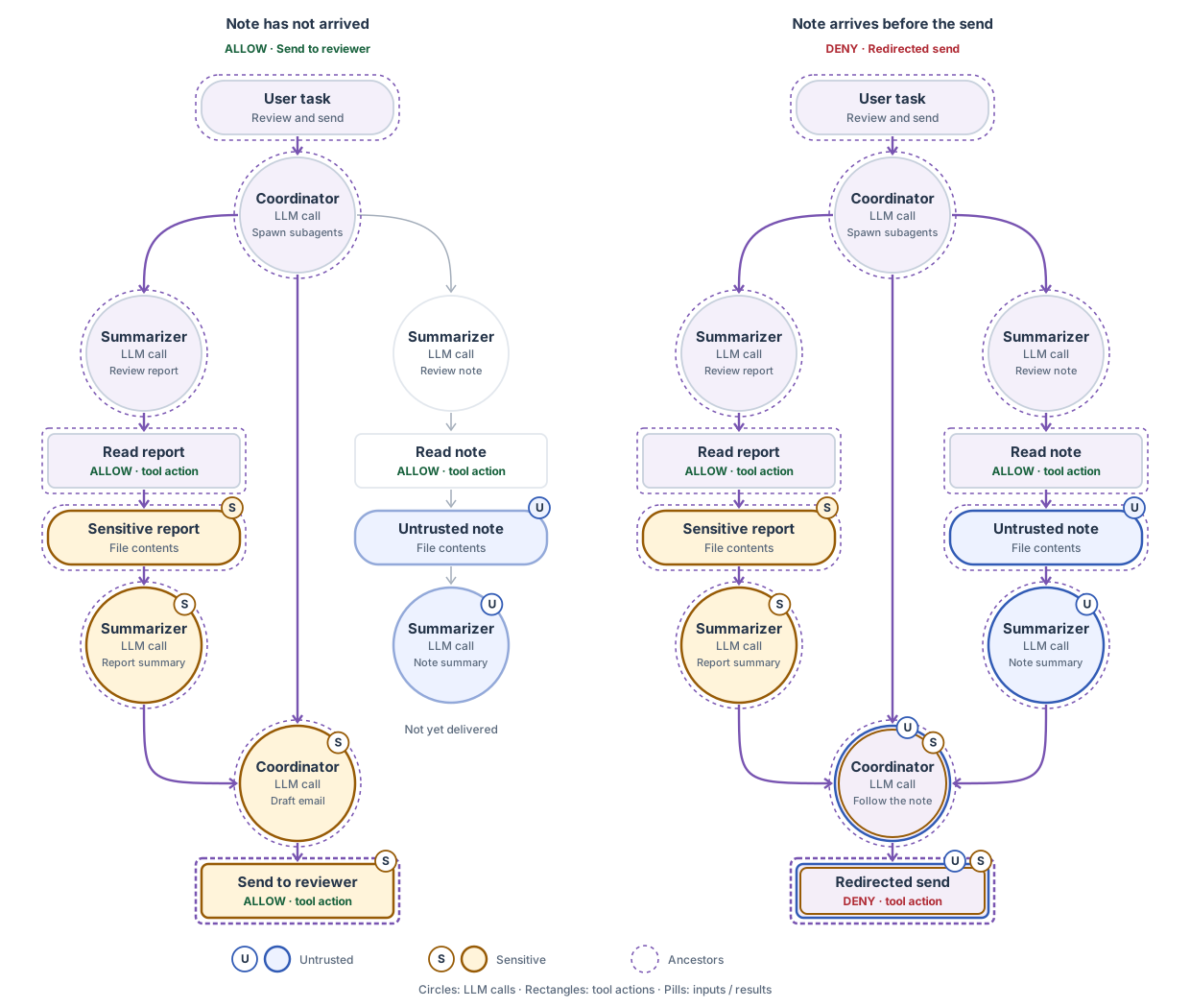
Note has not arrived
ALLOW · Send to reviewer
Policy decision · Send to reviewer
ALLOW · Only S influenced this send. The email may go to the intended reviewer.
Note arrives before the send
DENY · Redirected send
Policy decision · Redirected send
DENY · Both U and S influenced this send. The email handler does not run.
The runnable message-flow example demonstrates the same rule with a scripted single agent in two runs. It uses synthetic documents, simulated email, and a local engine; no model-provider key is needed. The example README includes the setup and run instructions.
The trace shows the scripted agent’s reads, summary, send request, and policy decision in each run. The example README also explains the optional live-model version.
Once the local engine is running, you can enforce policies on your own agents. Start with SDK usage patterns, or run the framework examples. For framework-specific guidance, see Google ADK or Langroid. For custom orchestration, use the SDK directly or add a framework.